Isekai Mugen Soul Online Devlog #2: Gameplay Mechanics in Action, The T-Pose Mystery & Asset Credits
A deep dive into our working gameplay mechanics: expanded 52m clearing, live farming, punch combat, the subjugation pipeline, and the engineering post-mortem of the AnimatorAvatar T-pose bug.
Welcome to Devlog #2 of Isekai Mugen Soul - Online!
In this update, we share the concrete mechanics running live in our production build, how we quadrupled the size of the starter clearing, and the fascinating technical post-mortem of how we diagnosed and eliminated a persistent animation retargeting bug.
⚔️ Mechanics Built & Running Live
1. The Expanded 52-Meter Homestead Clearing
Based on playtesting, our original 13 m radius clearing felt too intimate once construction began. We expanded CLEARING_RADIUS_M to 26 meters (a 52-meter diameter clearing, providing $2,123\text{ m}^2$ of open buildable ground—a 4× increase in surface area).
- An organic, dense tree wall seamlessly encloses the clearing, backed by an invisible mathematical barrier that guarantees no player can tunnel or glitch through.
- Interior trees, rocks, and bushes are scattered throughout for harvesting timber.
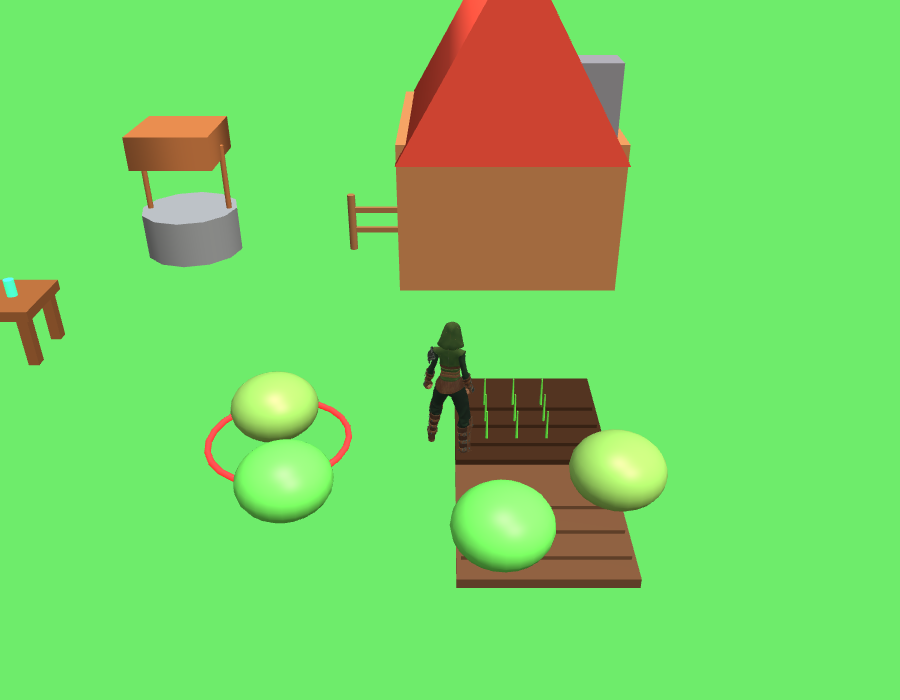
Live production capture: The expanded clearing with a starter cabin, water well, artisan workbench, tilled farm plots, and wild slimes.
2. Base Construction & Real-Time Farming
Pressing [B] opens Build Mode:
- Snapping Ghost Cursor: A green bounding volume snaps to the 2m grid in front of the player, verifying boundaries and collision in real time (turns red if obstructed).
- Structures Available:
[1]Small Cabin (15 Wood, 5 Stone)[2]Farm Plot (2 Wood)[3]Wooden Fence (1 Wood)[4]Stone Water Well (4 Wood, 10 Stone)[5]Storage Chest (5 Wood)[6]Artisan Workbench (6 Wood, 4 Stone)
- Farming Lifecycle:
- Walk up to an empty plot and press
[E]to plant Wheat, Potatoes, or Mana Herbs (playsFarm_PlantSeedanimation). - Press
[E]to water dry soil (playsFarm_Watering; soil visibly darkens when hydrated; rainfall also auto-waters). - Watch crops grow across 3 visual stages (Sprout $\rightarrow$ Growing Stalks $\rightarrow$ Golden Mature Heads).
- Press
[E]to harvest mature crops (playsFarm_Harvest).
- Walk up to an empty plot and press
- Artisan Crafting:
- Walk up to the Artisan Workbench and press
[E]to bake fresh Golden Bread (3 Wheat $\rightarrow$ Bread: $+25$ HP), Roast Potatoes ($+20$ HP), or brew Mana Tea ($+35$ MP).
- Walk up to the Artisan Workbench and press
3. Real-Time Combat & Punch Combo System
- Responsive Striking: Press
[J], stationary-click on the trackpad, or tap number keys[1]–[9]to strike with a fluid 2-hit punch combo (Punch_JabandPunch_Cross). - Frustum Tab-Targeting: Press
[Tab]to lock onto nearby enemies, or click directly on any monster. A glowing 3D ground ring rotates under the locked target, and a Target Health Frame tracks their vitals. - Floating Combat Text: Authoritative server damage (12–19 damage per strike) erupts as bouncing 3D floating damage numbers above the monster.
- Mob Counter-Attacks: Striking a monster provokes aggro, prompting it to pursue and retaliate against the player.
4. The 30% HP Subjugation Pipeline in Action
When a monster's health is weakened to $\le 30%$:
- The targeting ring switches to a pulsing golden aura.
- The target banner flashes:
⚡ WEAKENED — READY TO SUBJUGATE!. - An on-screen prompt
[E] Subjugate Creature (✨)lights up. - Pressing
[E]executes the subjugation formula, despawning the monster and converting it into a persistent Unique NPC Companion (such as "Aqua" or "Pip"). - The companion sports a luminous turquoise aura, a floating golden halo, and dynamic follower AI that stays by your side as you explore.
🔍 Engineering Post-Mortem: The Great T-Pose Mystery
During character integration, we encountered an insidious animation bug: while our character's torso and legs animated smoothly during runs and dances, the arms remained locked horizontally in a stiff T-pose across nearly all locomotion and idle clips.
The Investigation: Ruling Out the Obvious
Our initial diagnostic sweeps proved that the basics were sound:
- Bone hierarchy was verified correct (
root > pelvis > spine_01..03 > clavicle_l > upperarm_l > lowerarm_l > hand_l). - All 65 bones had active
_linkedTransformNodetargets in Babylon.js. - All 48 arm animation tracks were successfully rebound with zero rejected targets.
- Bone quaternions were changing frame-by-frame.
Yet when we measured the world-space distance from hand_l to spine_02, the numbers revealed the truth:
| Animation Clip | Arm Span (Hand to Spine) | Upper Arm Vertical Angle (elbowUp)* |
Observed Pose |
|---|---|---|---|
A_TPose |
0.691 m | 0.000 | Bind T-pose (horizontal) |
Idle_Loop (Buggy) |
0.682 m | -0.031 | Stiff horizontal T-pose |
Walk_Loop (Buggy) |
0.685 m | +0.020 | Stiff horizontal T-pose |
Dance_Loop |
0.738 m | -0.828 | Arms moving freely |
*elbowUp: 0.000 = straight out horizontally; -1.000 = hanging straight down.
The arms were technically moving, but only by a negligible ~7 cm around the bind pose!
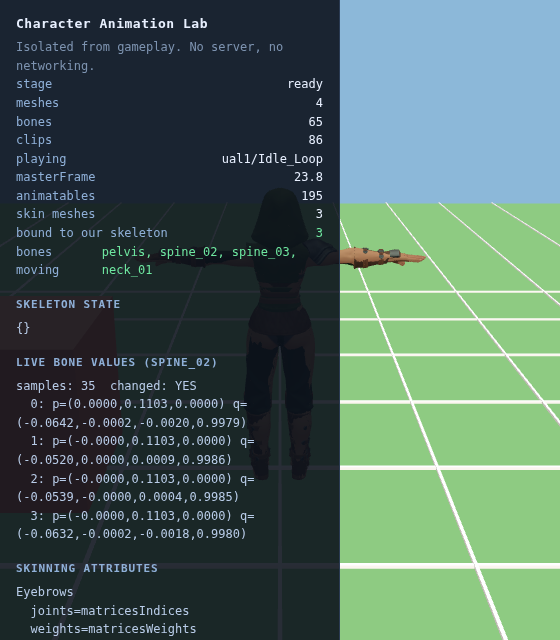 The bug: Character playing
 Idle_Loop in the isolated animation lab, but arms remain pinned horizontally in the bind pose.
The Smoking Gun: AnimationGroup.reset()
In our loading code, before retargeting each animation group from the library onto the character avatar, we had written:
// Ensure the source clip is not playing mid-frame
source.stop();
source.reset();
The intention was to ensure the source rig was at rest. But inside Babylon.js (animationGroup.ts lines 616–620), inspect what .reset() actually does when an animation is stopped:
if (!this._isStarted) {
    this.play();
    this.goToFrame(0);
    this.stop(true);
    return this;
}
source.reset() evaluates Frame 0 of that animation onto the source transform nodes!
When Babylon's AnimatorAvatar.retargetAnimationGroup() ran immediately afterward, it captured those transform nodes' current world matrices as the source rest reference pose ($S_{\text{rest}}$). For an idle or walk animation where every frame is close to Frame 0:
$$\Delta = K \cdot S_{\text{rest}}^{-1} \approx I$$
The retargeting algorithm calculated that the animation delta was approximately zero, and applied that zero delta to the target's bind pose—locking the arms directly to the target's rest T-pose! Only wild clips like Dance_Loop (which deviate dramatically from Frame 0) ever moved the arms out of the horizontal plane.
The Fix & Verification
We eliminated source.reset(). Before retargeting each clip, we explicitly return the source skeleton and all its linked transform nodes to their true bind rest pose:
for (const group of container.animationGroups) group.stop();
for (const sk of container.skeletons) {
  sk.returnToRest();
  for (const b of sk.bones) {
    b._linkedTransformNode?.computeWorldMatrix(true);
  }
}
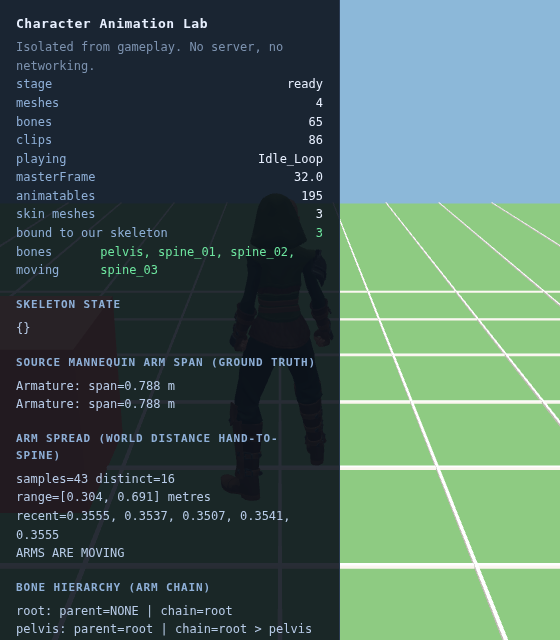 The fix:
 Idle_Loop playing with natural downward-hanging arms. Live bone spread telemetry confirms elbowUp = -0.931 and span drops to 0.35m.
The results speak for themselves:
| Animation Clip | Fixed Arm Span | Fixed elbowUp |
Result |
|---|---|---|---|
Idle_Loop |
0.351 m | -0.931 | Arms resting naturally at sides |
Walk_Loop |
0.304 m | -0.936 | Natural walking arm swing |
Jog_Fwd_Loop |
0.359 m | -0.863 | Natural running arm pump |
Punch_Cross |
0.418 m | -0.775 | Full forward punch extension |
🎨 Community & Asset Attributions
Even in this early prototype stage, achieving a cohesive, nostalgic visual presentation would be impossible without the incredible contributions of the indie game development community.
We extend our deepest gratitude and credit to Quaternius (quaternius.com / itch.io), whose masterfully crafted 3D asset packs (released under the CC0 / Quaternius Asset License) power our prototype:
- Universal Base Characters & Hairstyles: The 65-joint modular rigged character models.
- Modular Fantasy Outfits: The Ranger and Peasant clothing sets seamlessly bound to our skeleton.
- Universal Animation Libraries (UAL 1 & 2): 86 skeletal animation clips spanning locomotion, combat punch combos, 3-phase jumps, farming (planting, watering, harvesting), and wood chopping.
- Ultimate Nature Kit: The lush pine trees, rocks, clovers, ferns, and mushrooms that form our 52-meter forest enclosure.
- Dungeon Bestiary Monsters: The charming Slimes and Goblins populating our clearing and outer forest.
Thank you, Quaternius, for empowering solo and indie developers worldwide with top-tier modular game art!
Stay tuned for our upcoming playtest sessions, and follow along as we continue expanding the world of Isekai Mugen Soul Online!